


Every outcome and every vote, on the record
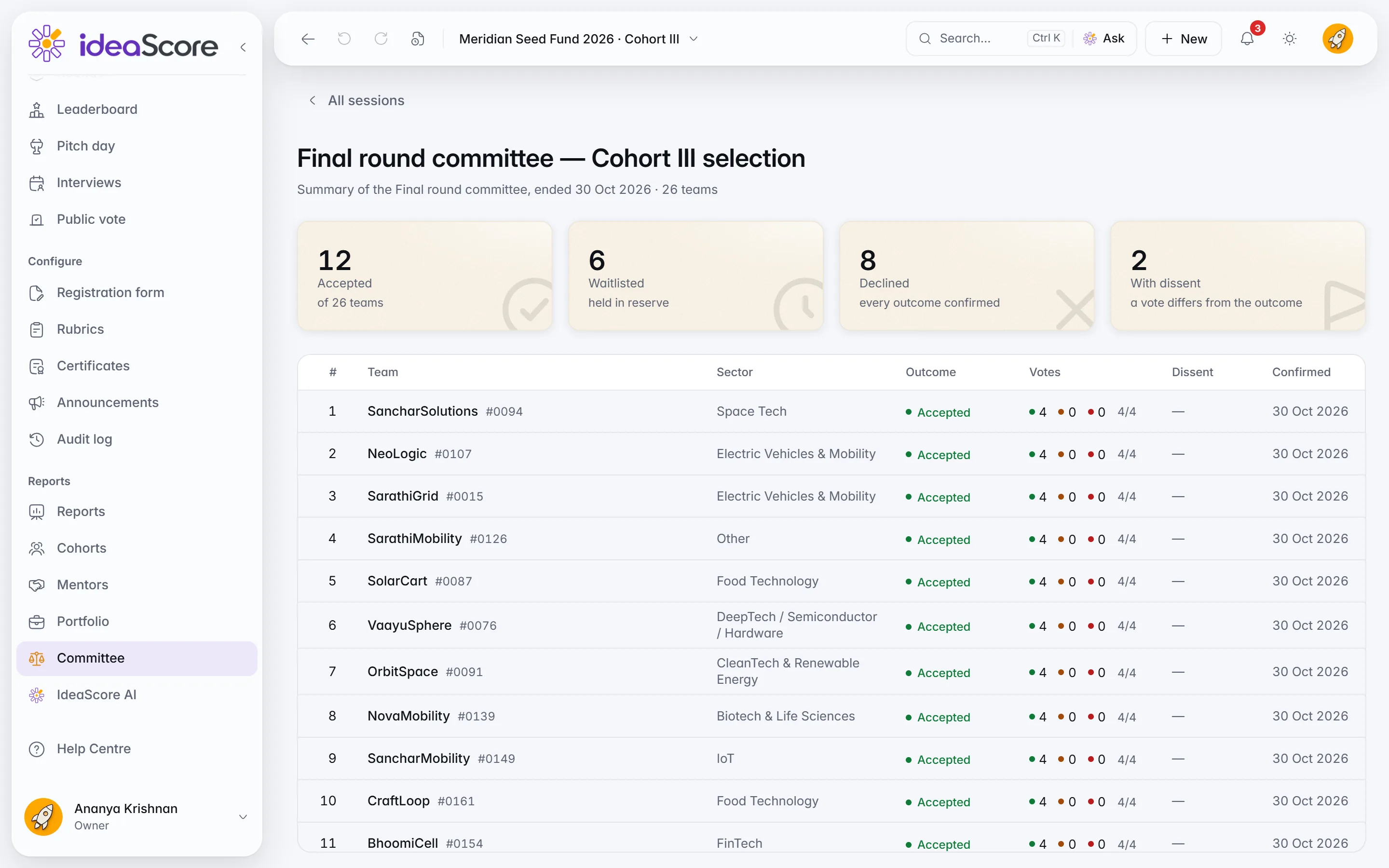
Schedule the session with a call link and calendar buttons. Afterwards, the Committee Report shows every outcome with dissent marked, ready to print or export.
Run the selection meeting in IdeaScore, draw the line between selected and waiting, check every letter before it goes, and answer any question later with who decided what, when and why.
Run the selection meeting, draw the line, check every letter before it goes, and know who decided what and why.
Members vote Accept, Waitlist or Decline from a laptop or phone. The chair confirms each outcome, and any vote that differs is recorded as dissent.
Halcyon Grid
#0142 · CleanTech · TRL 6
46.5 / 50
Rank 1
 IdeaScore AI summary
Grid-edge storage for rural feeders, with two paid pilots live. The seed round depends on one utility signing.
Business viability flagged for the committee by 2 evaluators
Panel scores in this session
| # | Team | Outcome | Dissent |
|---|---|---|---|
| 1 | Halcyon Grid #0142 | On screen | — |
| 2 | Tessel Labs #0118 | Up next | — |
| 3 | Orrin Health #0083 | Up next | — |
4 of 5 voted
How the committee voted stays hidden until the chair confirms the outcome.
Final round committee
Team 1 of 3
Halcyon Grid
#0142 · CleanTech · TRL 6
46.5 / 50
Rank 1
IdeaScore AI summaryGrid-edge storage for rural feeders, with two paid pilots live. The seed round depends on one utility signing.
4 of 5 voted
How the committee voted stays hidden until the chair confirms the outcome.
Schedule the session with a call link and calendar buttons. Afterwards, the Committee Report shows every outcome with dissent marked, ready to print or export.Put a round's shortlist before the committee, your own picks or the top N, and give the session a date, time, length and call link in the programme's time zone. Members see a Next meeting card with Join call and calendar buttons. Afterwards the Committee Report shows every outcome with dissent marked, ready to print or export.
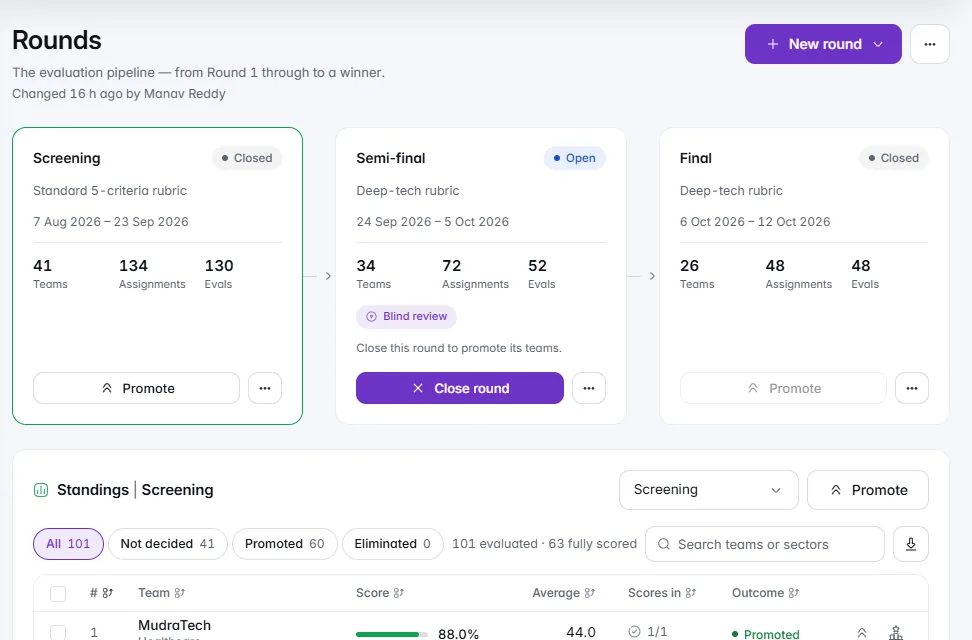
Promote by top N, a cut-off score or by hand. The Cut-Off Line shows who is selected, who is on the waiting list and who falls below the line.Close a round and promote the top N, everyone at or above a cut-off score, or the teams you tick, with ties at the line pointed out before you confirm. On Decisions, the Cut-Off Line shows the last teams in, the first teams out and the score gap between them. Drag it to take one team more or fewer, set how many follow on the waiting list, and everyone below the line is declined.
See every recipient, the exact letter each gets and why anyone is skipped. Send a test to me, then send now or schedule it.Send letters takes two steps and sends nothing until the end. Choose who and when, now or a date and time, then see every recipient grouped by Accept, Waitlist and Decline, with the exact letter each team will get. The Skipped tab says why a team will not get one: already sent, no email on file, or not decided yet. Send a test to me first; the last button says exactly what will happen.

Two or three cited lines on why a saved outcome stands, from the panel's scores and notes. Keep or skip each line, then save it to the decision note.For a saved decision, Draft the rationale writes two or three short lines on why the outcome stands, from the panel's scores, the judges' notes and the IdeaScore AI review, each with its sources. IdeaScore works out every figure itself, and a line with any other figure, or with no source, is left out. Keep or skip each line, then save it to the decision note.
Panel scores
Judge A's notesJudge C's notes
Criterion scores
Every applicant as a square: delivered, bounced or waiting. Each bounce says why, and Fix address sends the same letter again.Every Applicant Heard Back shows each applicant in the round as a square: green when the letter was delivered, red when it bounced, grey while the delivery report is on its way. Each bounce says why in plain words, with a likely fix. Choose Fix address, check it, decide whether it becomes the team's contact email, and the same letter goes again.
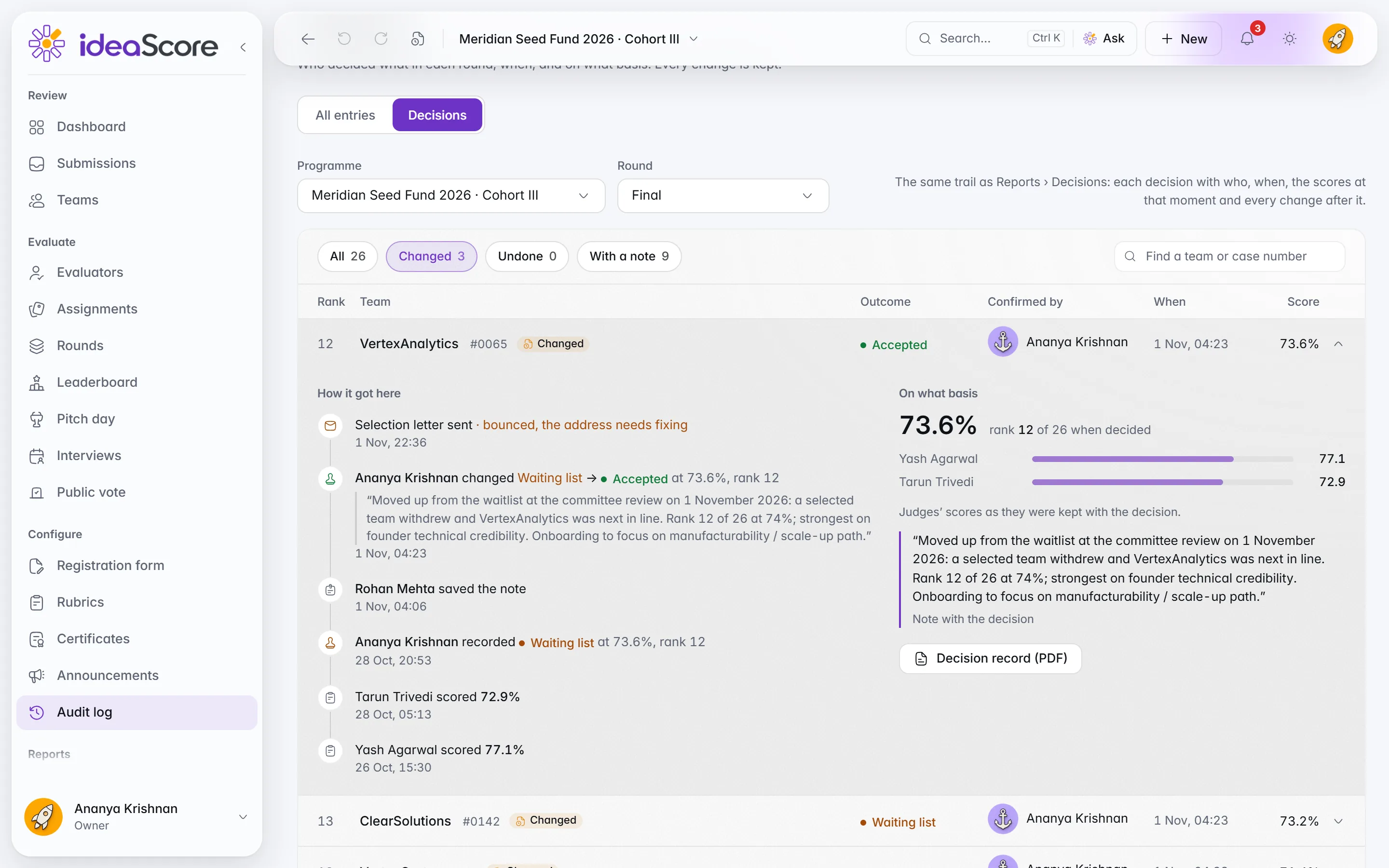
Every outcome, who confirmed it, when and the score at that moment. Open a line for how it got there. Nothing in it can be edited.The Decision Trail lists every team in a round with its outcome, who confirmed it, when, and the score at that moment, marked wherever an outcome changed or was undone. Open a line to see how it got there and on what basis: the score and rank when decided, each judge's score, the note and the letters. Nothing in it can be edited.
10 decisions in the Final round, each with who, when and the scores · 1 changed, 1 undone
Judges’ scores as they were kept with the decision.
Judges’ scores as they were kept with the decision.
Judges’ scores as they were kept with the decision.
Judges’ scores as they were kept with the decision.
“Accepted on condition the pilot site is confirmed by December.”Note with the decision
Judges’ scores as they were kept with the decision.
“Moved up when a place opened in the cohort.”Note with the decision
Judges’ scores as they were kept with the decision.
Judges’ scores as they were kept with the decision.
“First call if another place opens.”Note with the decision
Judges’ scores as they were kept with the decision.
Judges’ scores as they were kept with the decision.
“Encouraged to apply again once the second city pilot has run.”Note with the decision
Judges’ scores as they were kept with the decision.
Decision Trail
Final round · 10 decisions
Scores are those on record when each decision was made. Times in India Standard Time. Nothing in the trail can be edited.
Schedule the session with a call link and calendar buttons. Afterwards, the Committee Report shows every outcome with dissent marked, ready to print or export.
Promote by top N, a cut-off score or by hand. The Cut-Off Line shows who is selected, who is on the waiting list and who falls below the line.
See every recipient, the exact letter each gets and why anyone is skipped. Send a test to me, then send now or schedule it.
Two or three cited lines on why a saved outcome stands, from the panel's scores and notes. Keep or skip each line, then save it to the decision note.
Every applicant as a square: delivered, bounced or waiting. Each bounce says why, and Fix address sends the same letter again.
Every outcome, who confirmed it, when and the score at that moment. Open a line for how it got there. Nothing in it can be edited.
Committee sessions
Votes from any device
Dissent recorded
Promotion
Suggested decisions
Round conditions
Letter templates
Scheduled sending
Replies by a date
Email Log
Rationales in turn
Decisions in the Audit Log
Committee sessions
Votes from any device
Dissent recorded
Promotion
Suggested decisions
Round conditions
Letter templates
Scheduled sending
Replies by a date
Email Log
Rationales in turn
Decisions in the Audit Log
A 30-minute walkthrough with a product specialist, using your programme's form and criteria.