


Your logo, your colour, your words
Your logo and a partner's, your colour, your words and up to three signatures. The live preview is drawn by the engine that issues them, so it is the PDF.
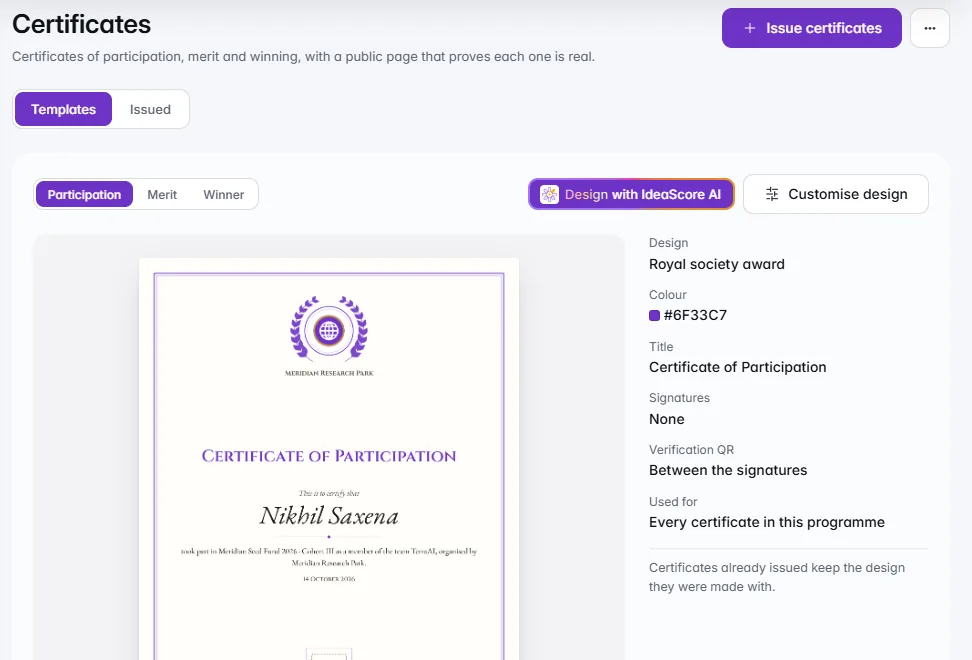
Participation, merit and winner certificates in your logo and colour, issued to the right people from your results. Each one carries a QR code and ID that opens a public page proving it is real.
Certificates in your logo and colour, issued from your results, each with a QR code that proves it is real.
Ten designs, each with its own page shape and seal, drawn with a real name from your programme.
Drawn for Aditi Sharma
QR code and ID bottom left, inside the rule, opening a public page anyone can check.
Drawn for Aditi Sharma
QR code and ID bottom left, inside the rule.
Your logo and a partner's, your colour, your words and up to three signatures. The live preview is drawn by the engine that issues them, so it is the PDF.Add your organisation's logo and a partner's, choose your colour, and write the title, the lines around the name and up to three signatures. The live preview is drawn by the same engine that issues certificates, so what you see is the PDF, and Try another name previews it with someone else from your programme.
A QR code and ID on every certificate open a public page: who it was issued to, the programme and whether it is valid. Never an email address.Every certificate carries a QR code and its ID. Scan it, or type the address printed along the bottom, and a public page shows who it was issued to, the programme, your organisation and whether it is valid or revoked, with the certificate itself drawn exactly as it was issued. It never shows an email address.

Choose the awards, a voice and who signs. IdeaScore AI designs one certificate per award, tried on your longest names; you change anything and save.Choose the awards you give, a voice (Celebratory, Formal, or Warm and plain) and who signs. IdeaScore AI picks a design and colour for each award and writes the words; IdeaScore then tests the colour on the paper, draws the longest name on each award's list and checks the QR's spot. Use these designs opens them in the live preview, where you change anything and save.
Participation by checkpoint or status, winners from your prizes, merit for the entries you tick. Made in the background; anyone who has one is skipped.Choose the kind and who should get one. Participation can be limited to a checkpoint or to certain registration statuses, winner certificates go to your prize winners, and merit to the entries you tick. Certificates are made in the background, so you can close the window and carry on, and anyone who already holds one of that kind is skipped.
Find any certificate by name, email or code, download it or revoke it with a reason. The public page then says revoked, and the record stays.The Issued tab finds any certificate by name, email or code, downloads it, or revokes it with a reason. Revoking keeps the record: the public page then says revoked and shows the certificate greyed out, and you can issue that person a new one. Every Certificate Proves Itself counts what has been issued and revoked, and turns a certificate over: printed, scanned or revoked.
Your logo and a partner's, your colour, your words and up to three signatures. The live preview is drawn by the engine that issues them, so it is the PDF.
A QR code and ID on every certificate open a public page: who it was issued to, the programme and whether it is valid. Never an email address.
Choose the awards, a voice and who signs. IdeaScore AI designs one certificate per award, tried on your longest names; you change anything and save.
Participation by checkpoint or status, winners from your prizes, merit for the entries you tick. Made in the background; anyone who has one is skipped.
Find any certificate by name, email or code, download it or revoke it with a reason. The public page then says revoked, and the record stays.
Ten designs
Three kinds
Partner logo
Signatures
Fields in the words
Executive honour
A design that suits the event
Name or logo
Sample PDF
Find any certificate
For participants
Audit log
Ten designs
Three kinds
Partner logo
Signatures
Fields in the words
Executive honour
A design that suits the event
Name or logo
Sample PDF
Find any certificate
For participants
Audit log
A 30-minute walkthrough with a product specialist, using your programme's form and criteria.