

Scholarships, Awards and Grants
Grants, fellowships, awards and scholarships, each reviewed and decided in its own words.Grants, fellowships and awards share one group with scholarships: invite proposals or nominations, have experts or a jury review them, and decide with every letter checked before it goes.

Grants and Fellowships
Invite proposals, have experts review them and award the grants.
Create a Programme
Your new call
DraftGrant or fellowship
- What it is
- What the type sets
The type, its words and its features can be changed in Programme Settings while the programme is a draft.
- Who it is for
- Grant, fellowship and innovation cells at universities, research parks, government missions and foundations.
- The words it uses
- How it is judged
- Expert reviewers score each proposal against your rubric, then a committee votes Accept, Waitlist or Decline and the chair confirms. Every decision letter is checked before it goes.
- Rounds it suggests
- EligibilityExpert reviewCommittee
- Switched on for you
- InterviewsCommitteeCohortsMentorsPortfolio
Fellowships
Choose the people to back, from application to final selection.
Create a Programme
Your new fellowship
DraftFellowship
- What it is
- What the type sets
The type, its words and its features can be changed in Programme Settings while the programme is a draft.
- Who it is for
- Fellowships that choose people rather than proposals.
- The words it uses
- How it is judged
- Reviewers score each candidate, the strongest are interviewed, and a final round selects the fellows.
- Rounds it suggests
- EligibilityExpert reviewInterviewsSelection
- Switched on for you
- InterviewsCommitteeCohortsMentorsPortfolio
Awards
Take nominations, have your jury shortlist them and name the winners.
- Who it is for
- Awards programmes run by institutions, associations and companies, from nominations to the winners.
- The words it uses
- How it is judged
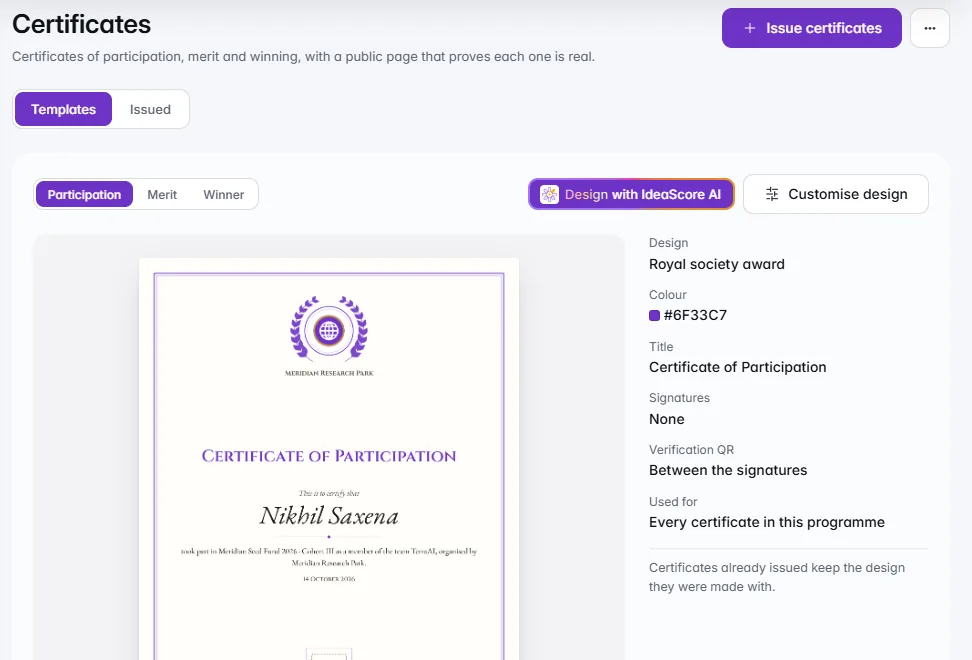
- Your jury ranks the nominees or compares them head-to-head, shortlists and names the winners. Winners receive a certificate anyone can verify.
- Rounds it suggests
- NominationsJury shortlistWinners
- Switched on for you
- Tracks, prizes and problemsJudging modesCertificates
Nominee consent
Nominees agree to be considered
Ask each nominee to agree before the jury reads their nomination. Juries see the nominee, never the person who nominated them.
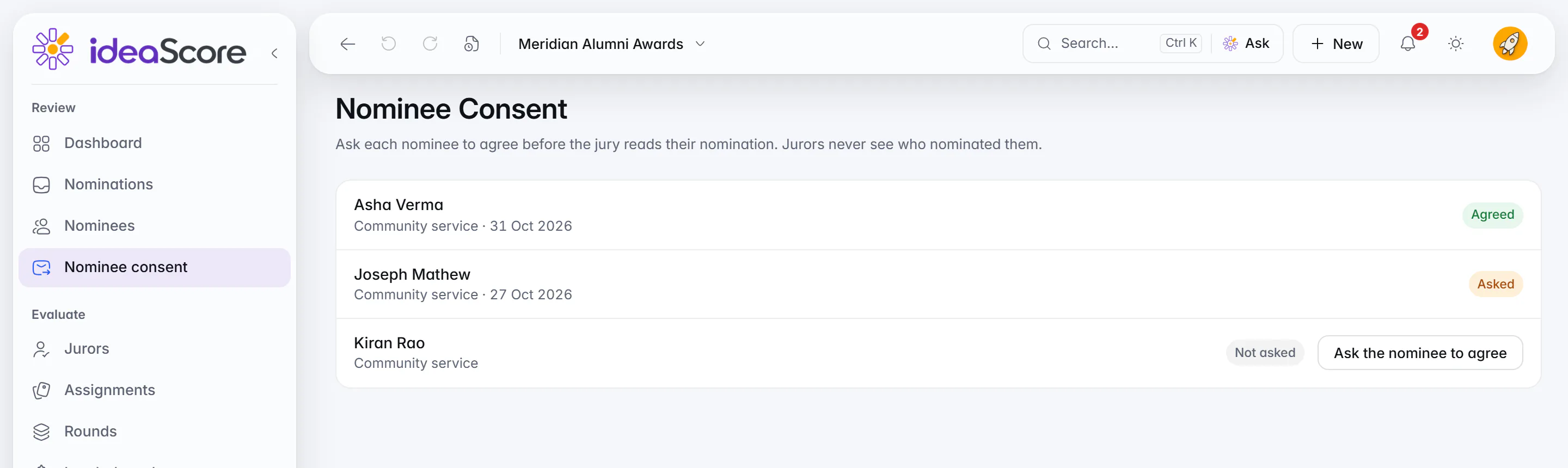
Nominee consent: each nominee agrees before the jury reads the nomination.
Scholarships
Check who is eligible, verify documents, choose the scholars and track each year's payments and renewal.
Create a Programme
Your new scholarship
DraftScholarship
- What it is
- What the type sets
The type, its words and its features can be changed in Programme Settings while the programme is a draft.
- Who it is for
- Universities, foundations and companies awarding scholarships on need and merit, with documents and a yearly renewal.
- The words it uses
- How it is judged
- Eligibility reviewers check the rules and documents, scorers read applications with sensitive answers removed, and an awards committee sets each award against the budget.
- Rounds it suggests
- Eligibility and documentsMerit reviewCommittee and awardRenewal
- Switched on for you
- CommitteeCohortsPortfolioCertificates
Set-up
Amounts, instalments, renewal and referees
Award, budget, places, instalments and renewal in one place. Referees need no account.Set the usual award, the budget and the places, split each year into instalments and choose how many years a scholarship renews. Referees get a private link by email and need no account, and you choose how long sensitive answers are kept.
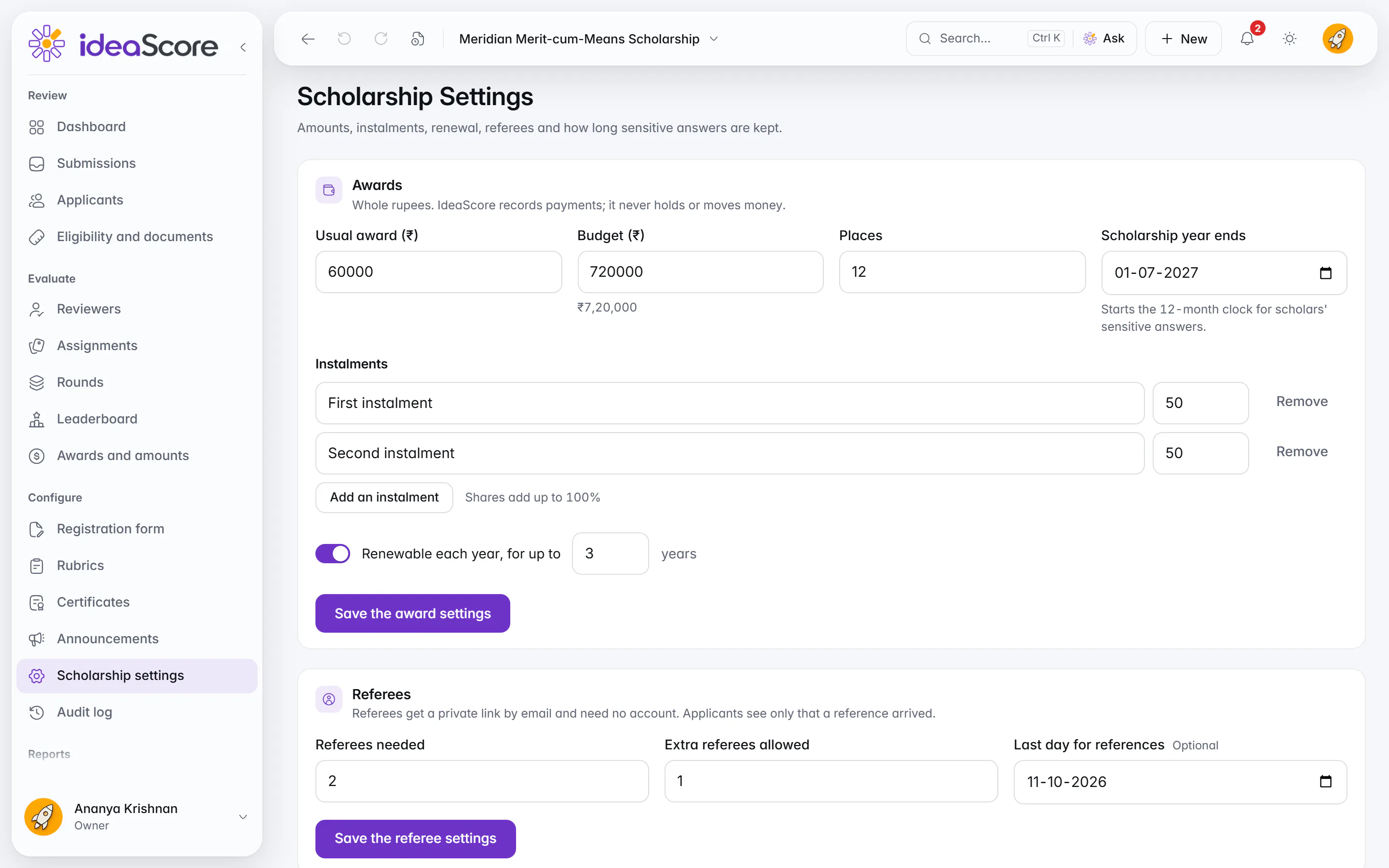
Scholarship settings: amounts, instalments, renewal and referees. Eligibility
Applicants check they are eligible first
Applicants check against the published rules first. Those answers are checked and forgotten.Before the application, applicants check their answers against the published rules. The answers are checked and forgotten, and in the application only the eligibility team sees the income answer.
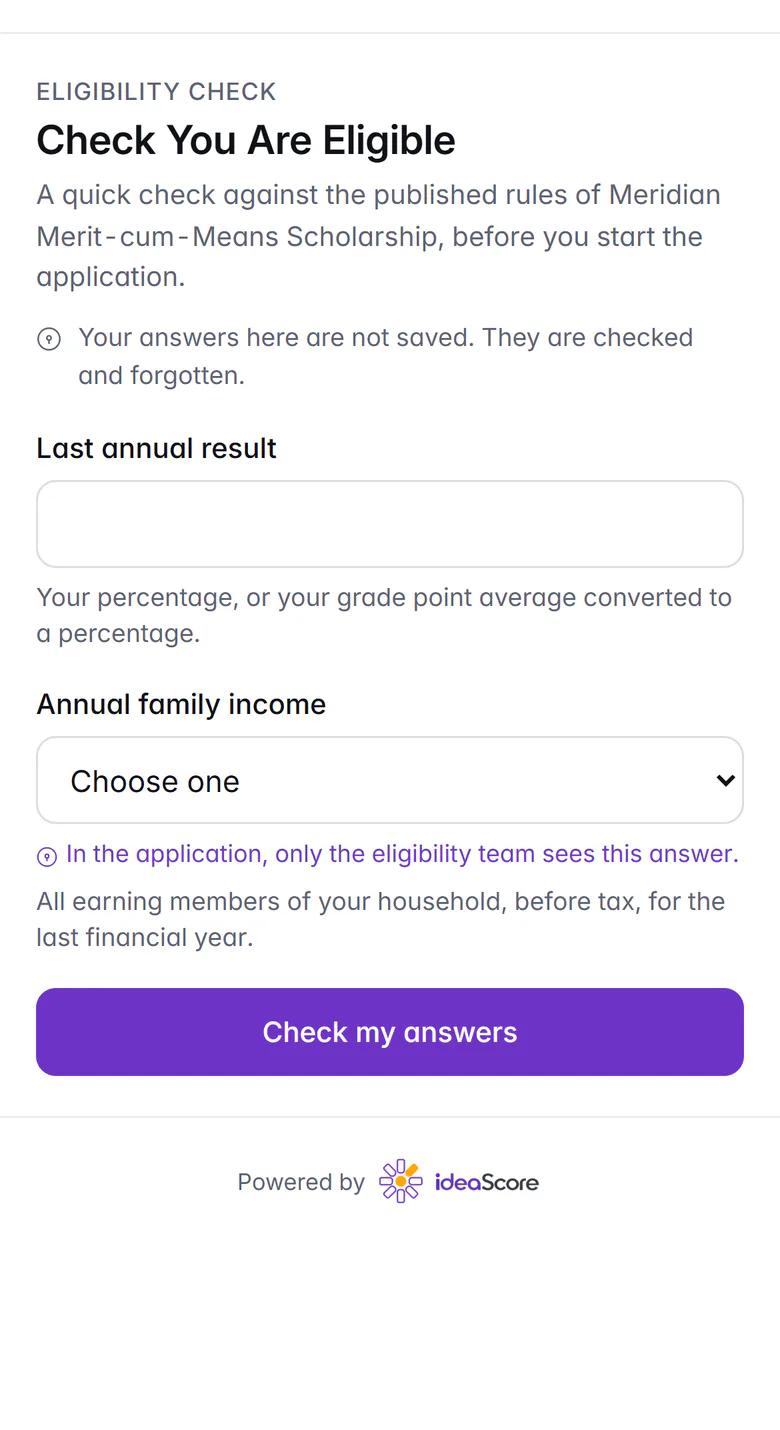
The eligibility check on a phone, before the application. Verification
Rules, documents and sensitive answers
Rules, documents and references checked in turn. Sensitive answers stay with the eligibility team.The eligibility team checks each application against the published rules and verifies its documents and references. Mark a question as sensitive and only the people who verify eligibility see the answers, kept for a retention period you set.
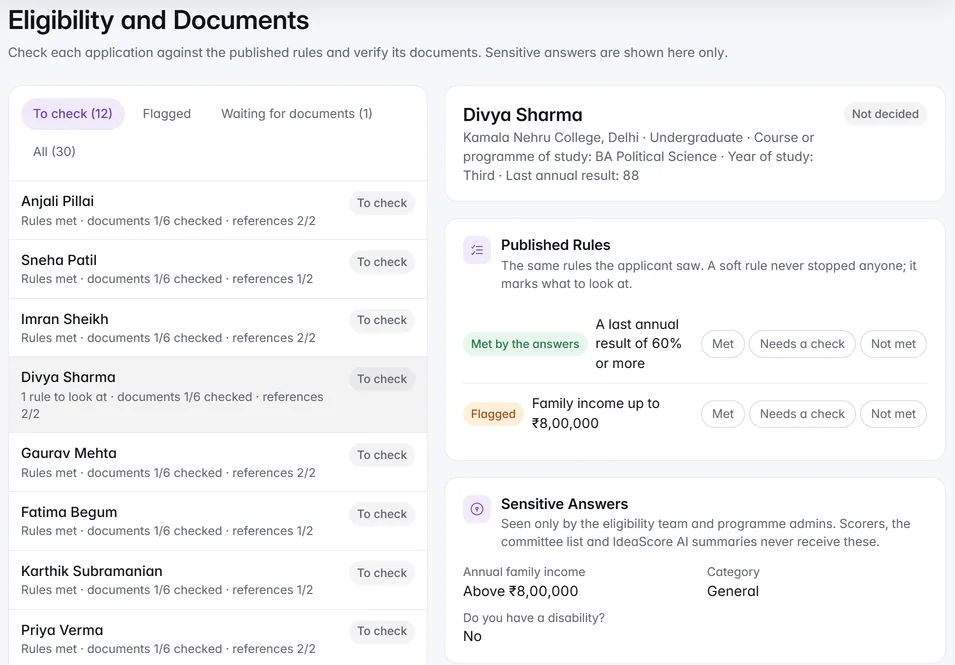
Eligibility and documents: the published rules and the sensitive answers, shown here only. Blind scoring
Blind scoring that holds
In scholarships, fellowships and awards, reviewers in a blind round see case numbers, and written answers reach them with names removed. An entry stays blind for the reviewers who judged it blind.
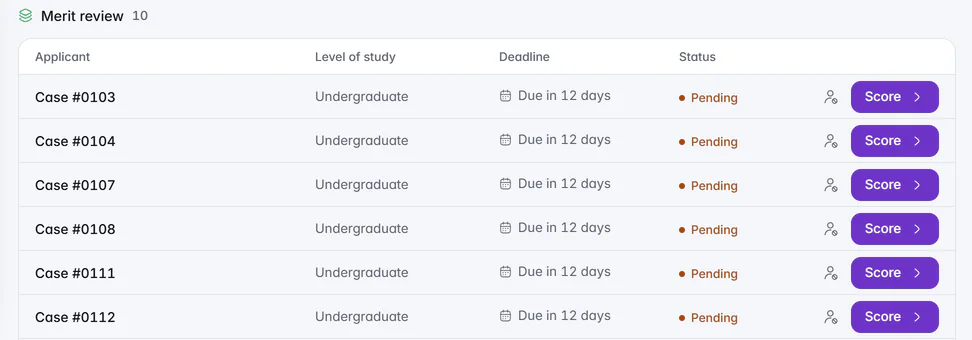
A blind merit round: case numbers and the level of study, never names. Awards
Awards against the budget
Choose the scholars and set each award against the budget, and see what is left as you go. Before you confirm, the page lists what is still open, such as a document waiting to be checked.
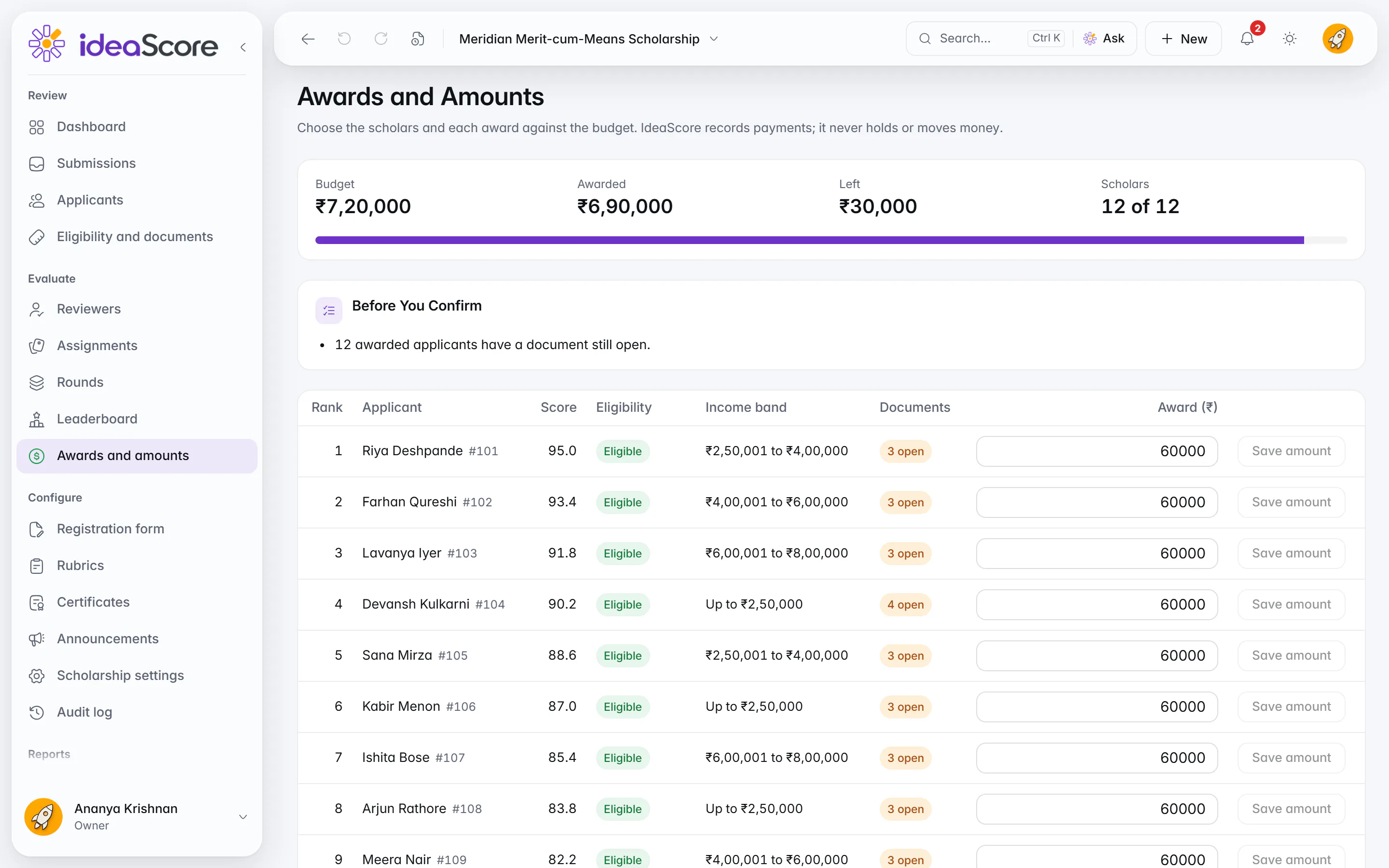
Awards and amounts: the shortlist, each award set against the budget. Instalments
Instalments and renewals, recorded
Record each instalment your organisation pays and decide each year's renewal against the condition you set. IdeaScore records payments; it never holds or moves money.
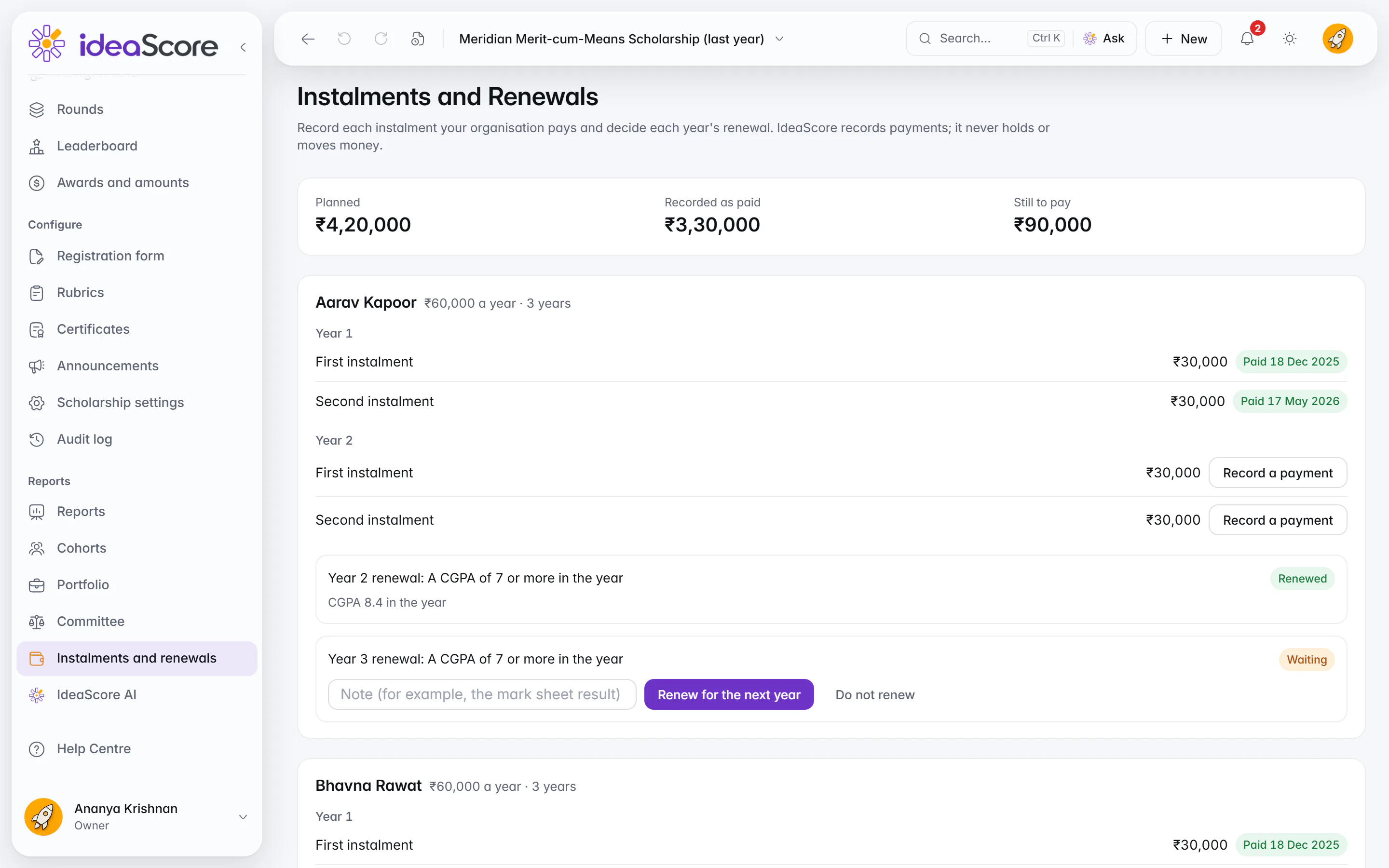
Instalments and renewals for each scholar.
Questions About Scholarships, Awards and Grants
See Your Kind of Event Set Up in IdeaScore
A 30-minute walkthrough with a product specialist, using your event's type, words and rounds.
Grants and Fellowships
Invite proposals, have experts review them and award the grants.
- Who it is for
- Grant, fellowship and innovation cells at universities, research parks, government missions and foundations.
- The words it uses
- EntryproposalSubmissionapplicationParticipantapplicantEvaluatorreviewerEventcall
- How it is judged
- Expert reviewers score each proposal against your rubric, then a committee votes Accept, Waitlist or Decline and the chair confirms. Every decision letter is checked before it goes.
- Rounds it suggests
- EligibilityExpert reviewCommittee
- Switched on for you
- InterviewsCommitteeCohortsMentorsPortfolio
Fellowships
Choose the people to back, from application to final selection.
- Who it is for
- Fellowships that choose people rather than proposals.
- The words it uses
- EntrycandidateSubmissionapplicationParticipantapplicantEvaluatorreviewerEventfellowship
- How it is judged
- Reviewers score each candidate, the strongest are interviewed, and a final round selects the fellows.
- Rounds it suggests
- EligibilityExpert reviewInterviewsSelection
- Switched on for you
- InterviewsCommitteeCohortsMentorsPortfolio
Awards
Take nominations, have your jury shortlist them and name the winners.
- Who it is for
- Awards programmes run by institutions, associations and companies, from nominations to the winners.
- The words it uses
- EntrynomineeSubmissionnominationParticipantnomineeEvaluatorjurorEventawards programme
- How it is judged
- Your jury ranks the nominees or compares them head-to-head, shortlists and names the winners. Winners receive a certificate anyone can verify.
- Rounds it suggests
- NominationsJury shortlistWinners
- Switched on for you
- Tracks, prizes and problemsJudging modesCertificates
Scholarships
Check who is eligible, verify documents, choose the scholars and track each year's payments and renewal.
- Who it is for
- Universities, foundations and companies awarding scholarships on need and merit, with documents and a yearly renewal.
- The words it uses
- EntryapplicantSubmissionapplicationParticipantapplicantEvaluatorreviewerEventscholarship
- How it is judged
- Eligibility reviewers check the rules and documents, scorers read applications with sensitive answers removed, and an awards committee sets each award against the budget.
- Rounds it suggests
- Eligibility and documentsMerit reviewCommittee and awardRenewal
- Switched on for you
- CommitteeCohortsPortfolioCertificates