

Spend Your Hours on the Teams, Not the Diary
Matched to the companies that need you, booked into the slots you offer, with notes turned into action items in a minute.The programme matches you to the companies that need your expertise, founders book the slots you offer, and a session's notes become action items in a minute. You give the advice; IdeaScore keeps the diary, the ratings and the follow-up.


A Mentor's Month
How your time with a programme runs once IdeaScore keeps the diary.
Joining
Your expertise and hours
Matched
The right companies
Every week
Office hours
After a session
Notes to action items
Every month
Your digest
What IdeaScore Does for a Mentor
A directory that knows what you are good at
Your expertise, hours and ratings in the programme's directory, with a flag if you are booked past the hours you gave.Each programme keeps a mentor directory with your expertise, the hours you can give and your ratings, beside the companies you work with and the sessions held. Anyone booked past the hours they committed is flagged, so a generous mentor is never quietly overloaded.
Matched by expertise and load
Suggestions by expertise and load, so you meet the companies that need what you know, not whoever asked first.Matching suggests mentors for each cohort member by expertise and by the load each mentor already carries, so you meet the companies that need what you know rather than whoever asked first. The programme team sees every cohort's members, milestones and upcoming events in one place, so a match starts from where each company really is.
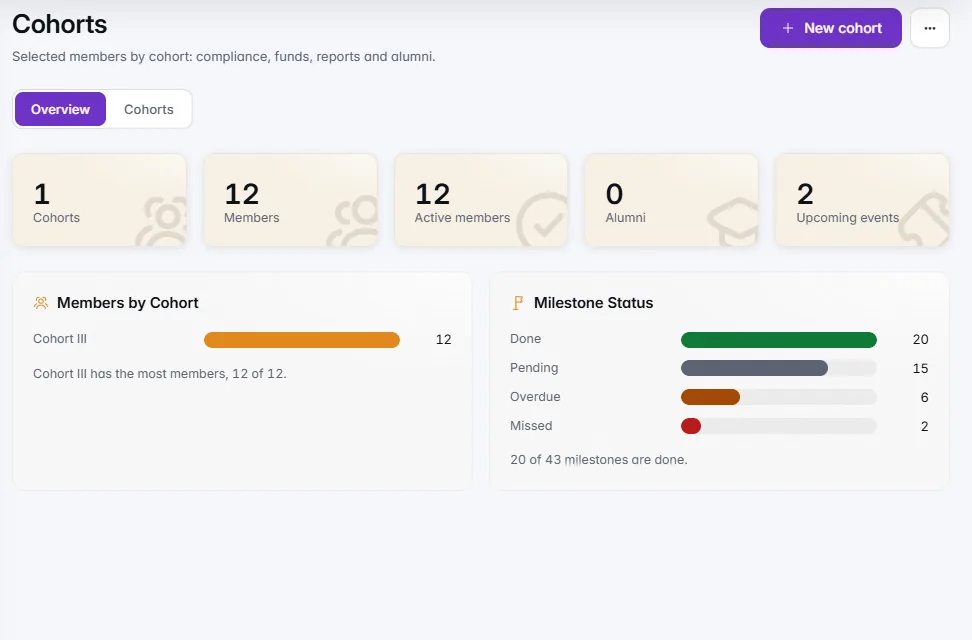
Office hours the whole programme can book
Your slots open to every company, a weekly series made in one go, and a join link and calendar buttons on every session.Offer your slots to every company in the programme instead of one company at a time. A weekly series is created in one go, members book the times that suit them, and attendance is marked afterwards. Times show in the programme's time zone, with your own alongside when you are elsewhere, and each session has its join link and calendar buttons.

Your notes become action items
Three to five action items from your notes, with who and by when, and a follow-up message you send yourself.After a session, Notes to action items turns your notes into three to five action items, each with who does it, founders, you or both, and a due date, plus a short follow-up message for the founders. Edit, keep or skip each one and save them to the session. IdeaScore never sends the message; you copy it and send it yourself.

- Founders · by 28 Oct
- Founders · by 21 Oct
- Mentor · by 4 Nov
- Both · by 18 Nov · Skipped
Ratings both ways, after every session
Ratings both ways after every session, one overview of sessions and hours, and a monthly digest for every mentor.After each session, ratings come back both ways, so the programme hears how mentoring is really going from founders and from you. The spread of ratings, the sessions held and the hours logged sit on one mentoring overview, and every mentor gets a monthly digest.
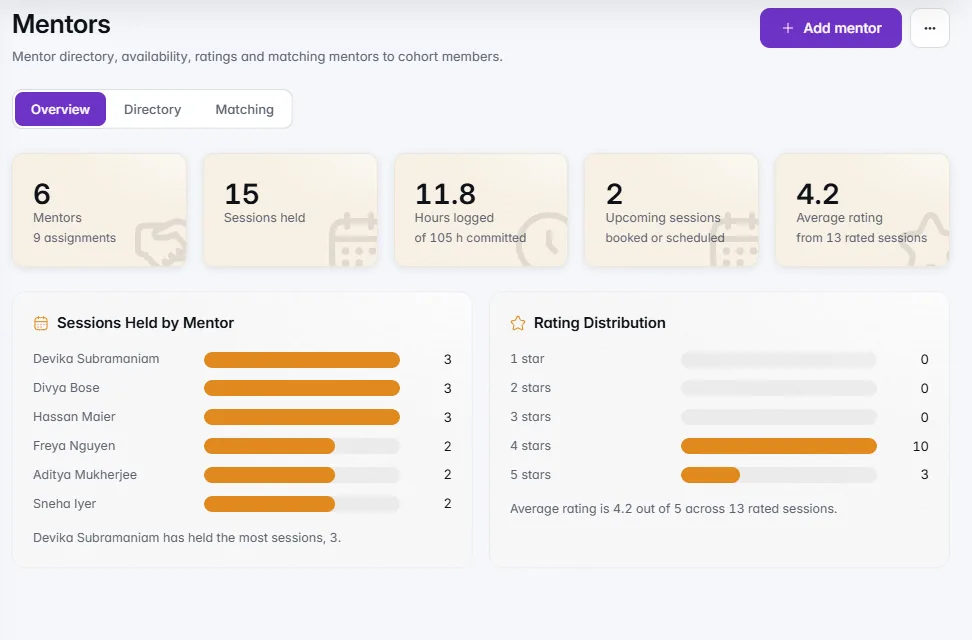
What founders see when they book you
Founders book your slots, rate sessions and report on milestones from a member space on their phone.Founders work from a member space on their phone: their agreement, milestones, tranches, events and mentoring, with what needs them now at the top. They book your time from the slots you offer, rate the session afterwards, and keep reporting against the milestones your advice is meant to move.

What IdeaScore AI Does for You Here
One helper, after each session. It drafts; you decide what is kept and what is sent.
Notes to action items
Free · reads that session's notes only
A follow-up message
Never sent by IdeaScore; you copy it
Names stay with you
IdeaScore puts the names back itself
What It Takes Off Your Plate
Back-and-forth over times
Writing up a session
Drafting the follow-up
Overcommitting
Time zone arithmetic
Hunting for the meeting link
Cancelling politely
Wondering how it went
Keeping track
Back-and-forth over times
Writing up a session
Drafting the follow-up
Overcommitting
Time zone arithmetic
Hunting for the meeting link
Cancelling politely
Wondering how it went
Keeping track
Questions Mentors Ask
Give Your Mentors Their Hours Back
A 30-minute walkthrough with a product specialist, from matching and office hours to the monthly digest.
A Mentor's Month
JoiningYour expertise and hours
MatchedThe right companies
Every weekOffice hours
After a sessionNotes to action items
Every monthYour digest
What IdeaScore Does for a Mentor
A directory that knows what you are good at
Your expertise, hours and ratings in the programme's directory, with a flag if you are booked past the hours you gave.
- Sessions held and hours logged for every mentor
- Fields the programme defines for its mentors
Matched by expertise and load
Suggestions by expertise and load, so you meet the companies that need what you know, not whoever asked first.
- Cohorts selected in IdeaScore or elsewhere
- Milestones on track, at risk, blocked or done
Office hours the whole programme can book
Your slots open to every company, a weekly series made in one go, and a join link and calendar buttons on every session.
- Cancel a session with a note both sides see
- A cancelled slot can be booked again
Your notes become action items
Three to five action items from your notes, with who and by when, and a follow-up message you send yourself.
- Reads that session's notes only
- Names are swapped and contact details removed first
- Founders · by 28 Oct
- Founders · by 21 Oct
- Mentor · by 4 Nov
- Both · by 18 Nov · Skipped
Ratings both ways, after every session
Ratings both ways after every session, one overview of sessions and hours, and a monthly digest for every mentor.
- Sessions by mentor and the rating spread
- A monthly digest for every mentor
What founders see when they book you
Founders book your slots, rate sessions and report on milestones from a member space on their phone.
- The same magic link they applied with
- Demo days, masterclasses and investor connects with RSVPs